
Picture a partner at a 15-person HR consultancy in Utrecht. She writes a clear post about what she's learned from onboarding new hires. Her colleagues like it, two clients comment, and then it goes quiet.
In Antwerp, an HR manager at a growing firm has exactly that question on her desk. She's never heard of the Utrecht partner, so the post never reaches her.
LinkedIn is working on that gap. In an engineering post, it describes a new source of posts from outside a member's network, called Profile Relevance. It uses language models to match members and posts on professional context, and LinkedIn says it complements the network and engagement signals it already uses. This article covers how LinkedIn recommends posts to people outside your network, and what that means for a partner, manager or marketer at a small firm. Where we're giving our interpretation, we say so.
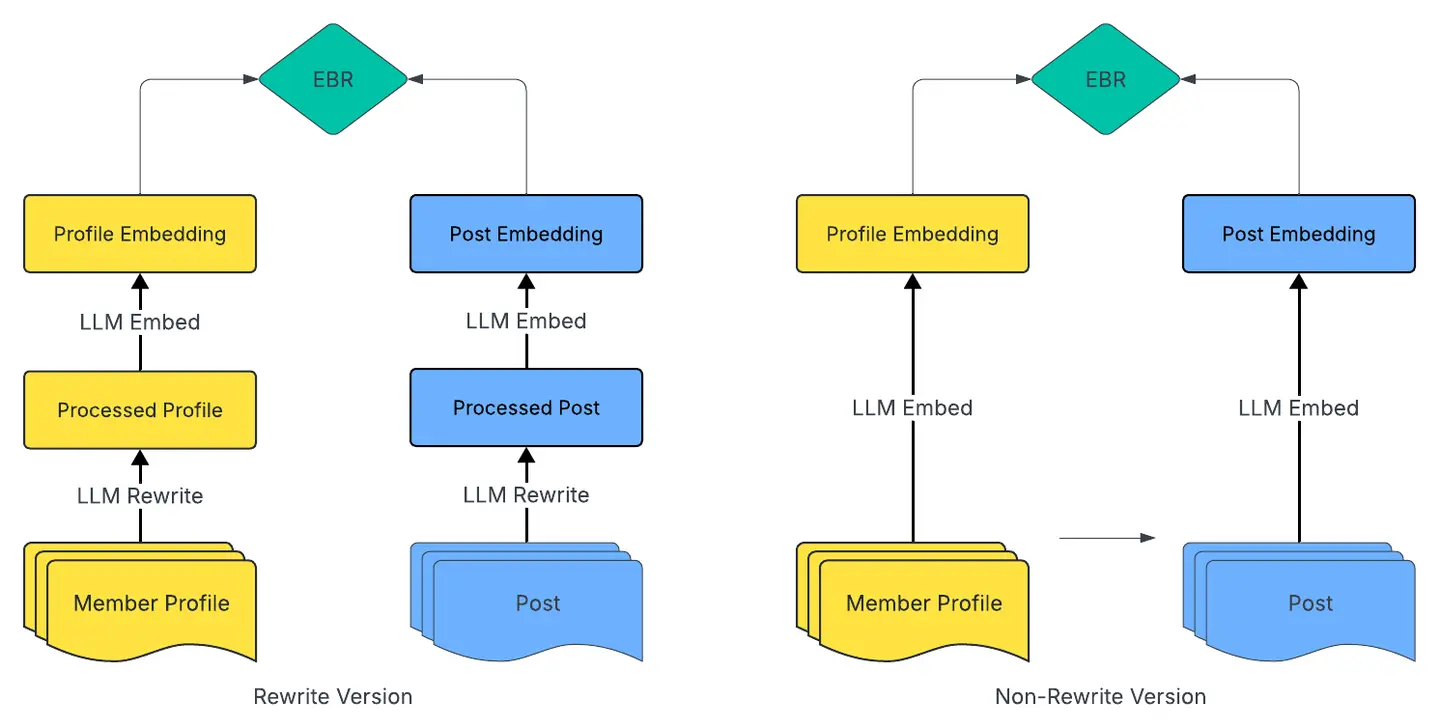
Your LinkedIn profile now does part of the work
According to LinkedIn, the member side of the match is built from public profile information: headline, summary and key skills, work history (companies, titles, durations, role descriptions) and education (schools, fields, degrees). It doesn't use your name or gender. On the post side, it uses the post's text, titles and transcripts of video or audio, plus author details such as location when available.
So the post and the profile of the person reading it get compared, and your profile sits on the other side of that comparison as well. We'd expect a profile that says "Partner" and little else to give the system less to work with than one that says what you do, for whom and in which sector.
Take a 30-person accountancy firm in Ghent. A manager there who writes about VAT for e-commerce clients gives the match far more if her headline and skills say so than if her profile still reads "Senior Manager, Tax" with an empty About section. Four places are worth a look:
- Headline: name your discipline and your clients, for example employment law for SMEs, or payroll and tax for owner-managed companies.
- About section: say in plain language who you help and with what.
- Skills: keep the ones you'd want a client to find you for and drop the rest.
- Role descriptions: write one or two real lines under each role.
LinkedIn also says it refreshes only the members whose profiles have changed. We read that as a reason to update your profile when your role does. If you became partner in September, moved from audit to advisory or joined a new firm, change the headline, About and role description that week. Our post on optimising a LinkedIn page for a law firm shows what a complete profile can look like.
If you coordinate posting for colleagues, ask each of them to do the same. Our piece on partners as creators covers how to involve them without it becoming a chore.
Say who a post is for, and where
Because the system reads the post itself, we'd expect a post that names its reader to give it more to match on. "Some thoughts on hiring" could be for anyone. "What a 20-person Dutch IT consultancy should settle before its first hire in Belgium" is for someone specific.
Location plays a role too. LinkedIn says it adds country, taken from the physical location in a member's profile, to the prompts for both members and authors, so that members see content reflecting their local professional context. Its example is regional industry discussions.
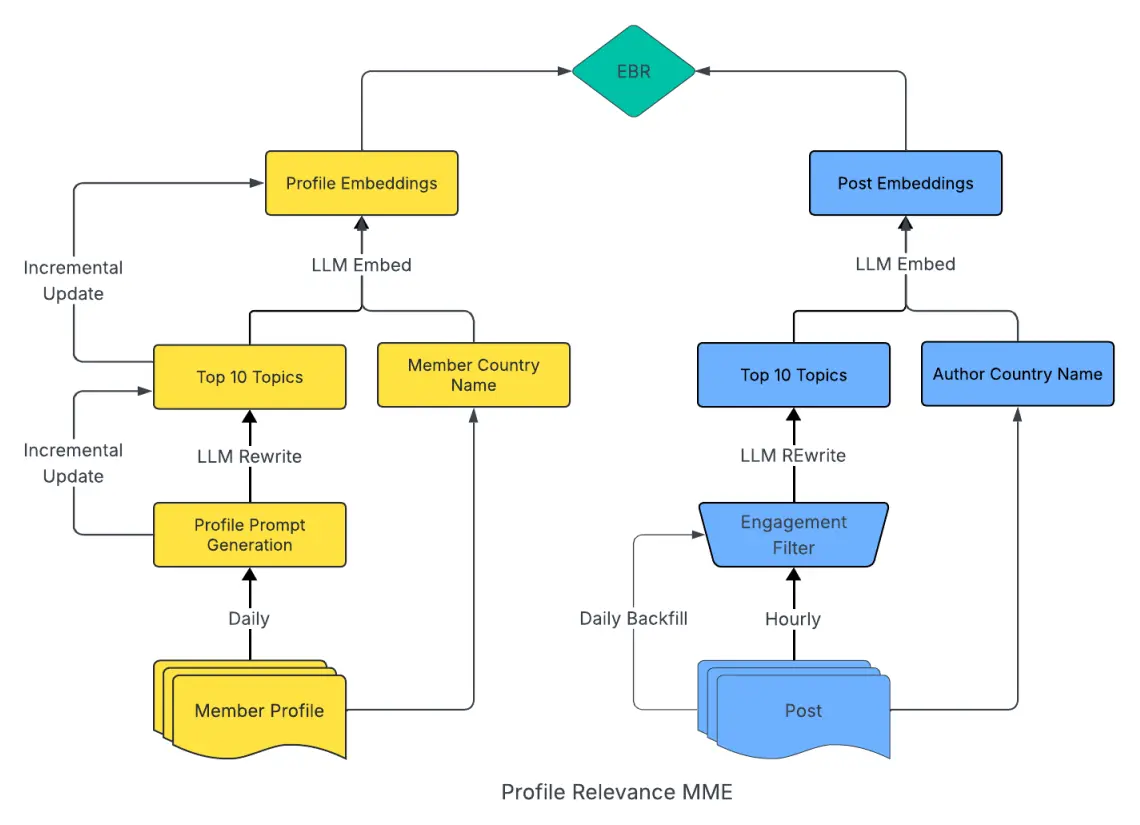
For a firm in Belgium or the Netherlands, that points toward posts with a clear local angle: Belgian or Dutch rules, your regional market, how things work in your sector here. Mentioning the Dutch or Flemish side of a topic costs one sentence, and it tells both the reader and the system where the post belongs. It also makes your profile location worth checking. If it's empty or out of date, the country signal has nothing to read.
Reactions from outside your network count early
LinkedIn says content from this source must first receive a single viral action (a like, comment or share) from an unconnected member before it's recommended. In its words, recommended posts have demonstrated early resonance with the broader community.
One reaction is a low bar, and it has to come from someone outside your network. A reaction from a connected colleague or client doesn't meet it, because those people are already connected to you.
That's a good reason to write for a stranger in your field. A concrete observation works, and so does a question people in your sector argue about, or a short explanation of something confusing. A plain firm announcement tends to interest your own circle. That's our interpretation.
How do you get the first reaction from outside your circle?
LinkedIn doesn't say, so this is our reading of how the feed works. You can see it yourself: when someone in your network likes or comments on a post, their connections often see it in their own feed, with a line such as "Y commented on this" or "X likes this". Those connections may not be connected to you. A reaction from someone you know can therefore put your post in front of the strangers who could react first.
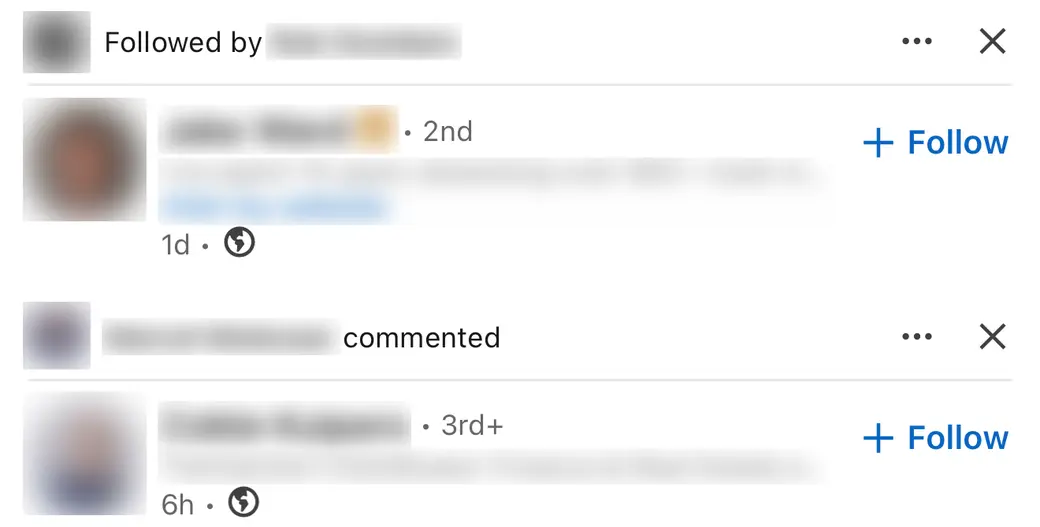
- Ask a few people close to the topic for a real comment. A sentence with a view or an example says more than a bare "great post", and a comment travels the way a like does.
- Spread it across more than one person. Each colleague who reacts brings the post to their own network, and a firm has several networks.
- Comment on other people's posts in your field. Your name appears in front of their audience, and some of them will open your profile, which is the other half of the matching.
It also helps to post from more than one place. A partner's profile, a colleague's profile and the company page reach different people, and company page vs. personal profile covers how they differ.
A small account can reach beyond its network too
With 400 followers, the Feed can feel like a room where the same few hundred people talk to each other. LinkedIn says this change helps creators who are still building an audience reach relevant people beyond their network.
It reports results too, all from its own experiments. Against its supervised MemberEBR source, the Geo + Engagement variant showed 0.54% more Feed Updates Viewed, a 0.94% higher viral rate and an 18.8% lower hide rate. For cold-start members, meaning those with limited activity, it reports a 17.7% increase in viral engagement and a 1.8% lift in daily active users.
Those numbers describe how LinkedIn's members behaved in a test. They say nothing about your next post. They do show what LinkedIn is aiming for, and it includes accounts like yours.
For a small firm, that makes a clear profile and a post with a clear reader the two things worth your time. Our post on what to post when you don't know what to post helps with the second.
What not to read into this
This is a description of one system, written by the company that built it. Keep it in proportion.
- It's one source among several. LinkedIn presents Profile Relevance next to network and engagement signals.
- No post is guaranteed anything. The early-reaction threshold applies first, and passing it promises nothing.
- The percentages are LinkedIn's. They come from LinkedIn's experiments and LinkedIn's reporting.
- The advice here is ours. LinkedIn describes the approach, and we've translated it for firms like yours.
Regular posting still matters. Every post is another chance to be matched with a reader, and our consistency report shows what regular posting looks like in practice.
Where to start
Start with the profile, because it's quick and it helps every post you write afterwards. Then pick the reader for your next post and say who it's for in the first lines.
At Willow, drafts are built from a profile of your firm (services, audience, tone, point of view), and a coach is on hand and reviews drafts on request. The profile work on LinkedIn itself is yours, and an hour is enough to do it properly.